

The PPC Tactics Construction Companies Use to Stop Wasting Ad Budget and Start Winning Jobs
I pulled up the account history last Tuesday and saw the same pattern I’ve seen in probably half the audits I run: $4,200 spent in March, 87 “leads” recorded, and when I asked the owner which ones turned into estimates, he said, “We stopped tracking after the first week—most were tire-kickers asking if we do residential work. We’re commercial-only.”
No conversion tracking. No negative keywords. Geo-targeting set to a 50-mile radius when their crews only work within 20. Performance Max running on autopilot because a YouTube video said it’s the future. The account wasn’t broken because Google is a scam. It was broken because nobody built the guardrails that turn PPC into a predictable lead source instead of a budget bonfire.
The Framework: Budget Protection Before Optimization
Most contractors start PPC backwards. They pick keywords, write ads, set a daily budget, and hope Google sends them jobs. When the spend climbs and the leads don’t convert, they blame the platform. What they’re missing is the control layer—the setup decisions that cap risk before you ever bid on a click.
You need a spending ceiling (daily budget), a service area boundary (geo-targeting), a quality filter (negative keywords), and a scoreboard (conversion tracking). Without those four, you’re guessing. And guessing with ad spend is how $2,000 turns into $6,000 in three weeks with nothing to show for it.
The Four Non-Negotiables
| Control Element | Purpose | Starting Point |
|---|---|---|
| Daily Budget | Caps maximum risk exposure | $30-$50 for local construction |
| Geo-Targeting | Eliminates out-of-area waste | Your actual service radius, not Google’s 30-mile default |
| Negative Keywords | Filters unqualified searchers | 40-60 term seed list (DIY, jobs, residential if commercial-only) |
| Conversion Tracking | Measures real performance | Tag every form fill and phone call from day one |
This isn’t about perfection. It’s about building a system where you can see what’s working and kill what isn’t before it drains your budget. I’ve seen accounts spend $8,000 in a quarter and generate six booked jobs. I’ve also seen accounts spend $1,200 and book four. The difference isn’t luck—it’s whether the operator knows where the money is going and can adjust the levers that matter.
Your daily budget is a throttle, not a commitment. If you’re getting flooded with junk leads, tighten geo-targeting, add negatives, and drop the budget 20% while you diagnose. If you’re booking solid estimates, raise it in $10 increments and watch cost per lead.
Split your campaigns so you can control spend and measure performance independently. Commercial roofing in your core county gets its own budget and tracking. Residential gets a separate test budget if you even want to chase it. When something underperforms, you cut one campaign without torching the whole account.
Step-by-Step: Setting Up Conversion Tracking and Negative Keywords
Conversion tracking is the single most skipped step in contractor PPC. If you don’t tag what happens after the click—form submission, phone call, estimate request—you’re flying blind. Google will keep spending your budget on whatever gets clicks, not what gets jobs.
Conversion Tracking Setup
Start with Google Ads conversion actions. You need at least two: one for form fills (contact form, quote request) and one for phone calls from your ads.
The form tracking requires a snippet of code on your thank-you page. If you’re on WordPress or a builder platform, most have plugins that handle this without touching code. For phone call tracking, Google provides a forwarding number that swaps in when someone clicks your ad. Set the conversion window to 30 days for forms and 7 days for calls.
Once tracking is live, label your leads. Not every conversion is worth the same. I have clients use a simple three-tier system:
- A-leads: Qualified, in service area, matches our scope
- B-leads: Qualified but timing is uncertain or budget is tight
- C-leads: Out of scope, DIY inquiries, job seekers
After 30 days, calculate your cost per A-lead. If you spent $1,500 and got 25 conversions but only 8 were A-leads, your cost per qualified lead is $187, not $60. That changes how you evaluate performance.
Building Your Negative Keyword Arsenal
Negative keywords stop Google from showing your ad to people who will never hire you. Start with the obvious: “how to”, “jobs”, “careers”, “salary”. Then add industry-specific terms. If you’re a commercial GC, add “residential”, “homeowner”, “handyman.” If you do high-end remodels, add “budget”, “affordable”, “discount.”
Every week, download the search terms that triggered your ads. You’ll find garbage: “how to install metal roofing yourself,” “roofing jobs hiring,” “cheapest roofer near me.” Add those exact phrases to your negative keyword list.
This isn’t a one-time setup. It’s ongoing hygiene. The accounts I see with the tightest cost per lead are the ones where someone reviews search terms every Monday and adds 5 to 10 new negatives.
One client came to me spending $200/day with a 60% click-through rate on terms like “roofing supplies” and “metal roofing panels for sale”—they’re an installation contractor, not a supplier. We added 80 negative keywords in the first week and cut daily spend to $120 while doubling qualified leads.
Google Ads vs Local Services Ads: Choosing Your Weapon
This is the question I get in every kickoff call: “Should we run Google Ads, Local Services Ads, or both?” The answer depends on your risk tolerance, lead volume goals, and whether you can handle phone calls during business hours.
Google Ads (Search Campaigns)
What You Get: Complete control over keywords, ad copy, geo-targeting down to ZIP code level, bid strategies, and scheduling. You only pay when someone clicks. You can A/B test everything and scale aggressively when something works.
What It Costs: Time and expertise. You need to manage negative keywords, adjust bids, monitor quality score, and track conversions. If you’re not willing to spend 2 to 3 hours a week on it—or hire someone who will—Google Ads will eat your budget.
Best For: Contractors who want scale and are willing to optimize. You can target high-intent keywords like “commercial concrete contractor [city]” or “emergency roof repair,” write ads that pre-qualify budget and scope, and send clicks to a landing page that filters out tire-kickers.
Local Services Ads (LSA)
What You Get: Pay-per-lead pricing, not pay-per-click. Google vets your business (license, insurance, background checks), and when someone in your service area searches for your trade, your profile shows up at the top with a green “Google Guaranteed” badge. You set a weekly budget and a per-lead price cap (usually $20 to $60 depending on trade and market).
What It Costs: Control. You can’t pick keywords, write custom ads, or target specific project types. Google decides when to show you based on proximity, reviews, and responsiveness.
Best For: Contractors who want predictable lead costs and don’t have time to babysit a campaign. You know your max cost per lead upfront. You’re not competing on keywords or worrying about click fraud.
My Recommendation
Start with LSA if you’re new to PPC or burned by past Google Ads disasters. Set a $500/week budget, get 10 to 15 leads, track which ones turn into estimates and jobs, and calculate your cost per booked job. If that number works (cost per job is less than 10% of average project value), scale LSA and add Google Ads as a second channel.
Run Google Ads with a $30/day budget, laser-focused on your top 3 to 5 service keywords, with tight geo-targeting and conversion tracking. Compare cost per qualified lead across both platforms after 60 days. Double down on whichever delivers better ROI, or run both if your lead volume goals demand it.
What to Watch: Weekly Metrics That Predict Budget Blowouts
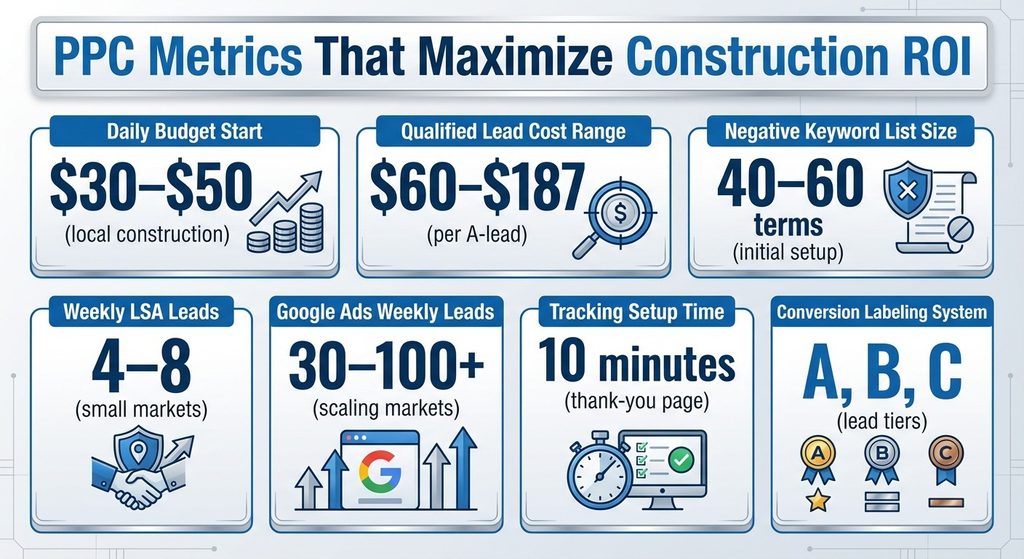
You don’t need to check your account every day, but you do need a weekly review routine. Block 20 minutes every Monday and look at five numbers: total spend, cost per conversion, conversion rate, search terms, and geographic performance.
Total spend is obvious—did you stay within your weekly target, or did Google front-load your budget early in the week? If you set a $50/day budget and spent $280 by Wednesday, check your bid strategy. Automated bidding can spike spend if Google thinks it found a hot streak. Switch to Manual CPC or set a max CPC bid cap until you understand why the spend jumped.
Cost per conversion and conversion rate are your efficiency gauges. If cost per conversion climbs 30% week-over-week, something shifted—maybe a competitor raised bids, maybe your ad relevance dropped, maybe you’re showing up for broader search terms. Drill into search terms and see what’s new.
Search terms are where you catch waste. Sort by cost and look at the top 20 terms that spent your budget. Are they relevant? Are they converting? If you see “roofing jobs,” “roofing materials,” or “how to roof a house,” those are negatives you missed. Add them.
Geographic performance tells you if your radius is too wide. If you’re spending 40% of your budget on clicks from a county where you rarely work, tighten your targeting or exclude that area. I had a client targeting a 25-mile radius who was getting clicks from a neighboring metro where they didn’t have crews. We cut the radius to 15 miles and cost per lead dropped 35% overnight.
Troubleshooting: When Leads Spike But Quality Tanks
This is the scenario that makes contractors want to quit PPC entirely: spend doubles, lead volume triples, but none of them turn into jobs. It feels like Google is sending you junk on purpose. It’s not. It’s sending you exactly what your campaign is asking for—clicks from anyone searching your keywords within your geo-target.
Fix #1: Check Your Match Types
If you’re running broad match keywords without a tight negative list, Google is showing your ad for loosely related searches. “Roofing contractor” on broad match can trigger for “roofing supplies,” “roofing jobs,” “roofing cost calculator.” Switch to phrase match or exact match until you’ve built a robust negative list.
Fix #2: Audit Your Ad Copy
Are you pre-qualifying? If your ad says “Affordable Roofing Services,” you’re attracting price shoppers. If it says “Commercial Roofing for Industrial & Retail Projects – Licensed & Insured,” you’re filtering for your ideal customer. Your ad copy should repel bad-fit leads as much as it attracts good ones.
Fix #3: Optimize Your Landing Page
If you’re sending clicks to your homepage, you’re losing 60% of them before they even read your offer. Build a dedicated landing page for each campaign with a clear headline (what you do), social proof (reviews, project photos), and a single call-to-action (call now or request a quote). Remove navigation menus and distractions.
When the Problem Is Deeper
If leads are still low-quality after those fixes, the issue might be your offer or market position. If you’re a high-end remodeler competing on keywords like “bathroom remodel,” you’re going to attract budget-conscious homeowners. Shift to keywords like “luxury bathroom remodel” or “custom home renovation” and accept lower volume in exchange for better fit.
Your First 30 Days: A Startup Checklist
If you’re restarting PPC or launching for the first time, here’s the sequence that minimizes risk and maximizes learning.
Week One: Foundation
- Set up conversion tracking for forms and calls
- Build a negative keyword list of 40+ terms
- Define your geo-target to your actual service area
- Set a daily budget you can afford to lose while learning—$30 to $50
Week Two: Launch
- Launch one search campaign with 5 to 10 high-intent keywords in phrase or exact match
- Write ads that pre-qualify scope and budget
- Send clicks to a dedicated landing page
Week Three: Monitor
- Review search terms daily
- Add negatives
- Track which leads are qualified
- Label them A/B/C
Week Four: Evaluate
- Calculate cost per A-lead
- Compare it to your target (usually 8-12% of average project value)
- Decide whether to scale, pause, or pivot
That’s it. No Performance Max. No display network. No YouTube pre-roll. Just search ads, tight targeting, and obsessive tracking. Once you prove the model works—qualified leads at a cost that supports your margin—then you can test other formats.
For those ready to implement a complete strategy that ties these tactics together, ppc for construction companies offers a deeper framework for aligning ad spend with business goals and scaling what works. The key is proving the fundamentals first: tracking, targeting, and lead quality. Everything else is optimization on top of a system that already protects your budget and delivers measurable ROI.
About the Author