Home Service Businesses That Generate Leads Consistently All Share These Same Habits
I spent seven years managing HVAC service crews before I started cleaning up marketing messes for contractors. The same problem shows up every week: an owner calls me after a slow stretch, frustrated because they spent $3,000 on Google Ads last month and can’t tell me how many jobs came from it.
When I ask to see their CRM, they send me a Google Sheet with first names and phone numbers. When I ask about follow-up, they say “we call them back when we can.”
That’s not a lead problem. That’s a system problem.
The contractors who never have slow weeks—the ones booking two weeks out even in shoulder season—aren’t running more ads or spending more money. They built a lead generation system that captures every inquiry, tracks where it came from, follows up automatically, and proves which channels actually turn into booked jobs.
The Expensive Myth: “I Need More Leads”
Most home service owners don’t have a lead volume problem. They have a lead management problem, and they’re about to spend $5,000 on Facebook ads to make it worse.
Here’s what I see when I audit their Google Business Profile:
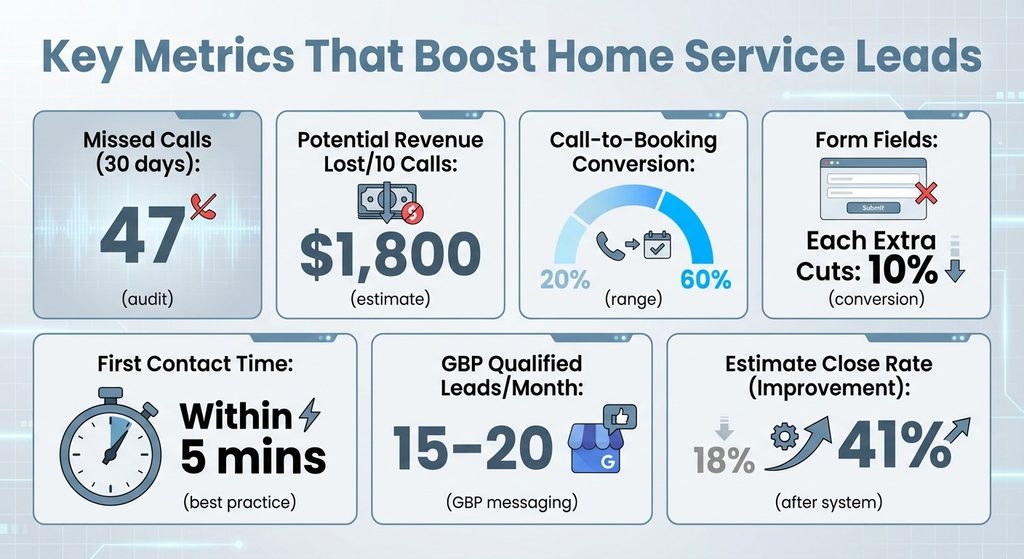
- 47 missed calls in the last 30 days
- 12 website form submissions with no reply
- $2,400 spent on PPC, 83 clicks, zero tracking past the click
They’re hemorrhaging opportunities they already paid for, then blaming “bad leads” or “the wrong audience.”
The Hidden Cost of Missed Opportunities
The math is brutal. If you’re converting 20% of answered calls into booked estimates and closing 60% of those, every missed call costs you about $180 in potential revenue (assuming a $1,500 average ticket).
Miss ten calls in a week and you just lost $1,800—more than most small PPC budgets.
Before you scale anything, you need to capture and convert what’s already coming in.
The Four-Part Framework: Capture, Track, Convert, Prove
A working lead generation system for home services has four non-negotiable pieces that must connect to each other.
| System Component | What It Does | Why It Matters |
|---|---|---|
| Capture | Funnels all lead sources into one place | Nothing gets lost in personal phones or forgotten voicemails |
| Track | Tags every lead with its source automatically | You can’t fix what you can’t measure |
| Convert | Structured follow-up that doesn’t depend on memory | Pros who close 50% follow up six times; amateurs give up after two |
| Prove | Weekly reports showing cost per booked job by source | Know exactly where to double down and where to cut |
Capture means every lead source—your Google Business Profile, website, PPC ads, social media, even referrals—funnels into one place. No texts in your personal phone. No forgotten voicemails. One inbox, one system.
Track means tagging every lead with its source the moment it arrives. When someone fills out your landing page form, your CRM automatically marks it “Website – Service Page.” When a call comes from your Google Ads number, it gets tagged “PPC – Emergency Repair.”
Convert means structured follow-up that doesn’t depend on memory. First contact within five minutes. Text confirmation if they don’t answer. Second attempt four hours later. Email with your calendar link. Third attempt next morning. Then a nurture sequence for leads who aren’t ready yet.
The contractors who close 50% of their estimates follow up six times. The ones who close 20% follow up twice and give up.
Prove means running a simple report every Friday showing cost per lead by source, answer rate, booking rate, and cost per booked job. If your Google Business Profile generates estimates at $40 each and your PPC costs $340 per booked estimate, you know exactly where to double down and where to cut.
Step One: Set Up Your Capture System (Google Business Profile + Landing Page + CRM)
Start with your Google Business Profile because it’s free, it’s local, and most home service leads begin with a Google search.
Optimizing Your Google Business Profile
Log into your GBP dashboard and make sure your business category is specific—”HVAC Contractor” beats “Home Improvement” every time. Add your service area cities one by one.
Upload ten recent project photos with captions that include your city and service type: “Furnace replacement in Arlington, VA.” Post weekly updates—a before/after, a seasonal tip, a limited-time offer.
Turn on messaging so leads can text you directly from your profile, and connect those messages to your CRM or shared inbox. GBP messaging can generate 15–20 qualified leads per month for small contractors who reply within ten minutes.
Wait two hours and conversion drops by half.
Building Landing Pages That Convert
Your website landing page is next. You need one page per core service (furnace repair, gutter cleaning, pest control) with a clear headline, three trust signals (years in business, reviews, certifications), a simple form, and your phone number in huge text at the top.
The form should ask for name, phone, email, and service needed. That’s it. Every extra field cuts conversions by 10%.
Connect your landing page form to your CRM using Zapier or the CRM’s native integration. When someone submits the form, a new lead record should appear instantly with the source tagged “Website – Furnace Repair Page.”
Choosing the Right CRM
For CRM, start simple. I recommend home services lead generation platforms built for contractors—they understand job types, service areas, and estimate workflows.
If you’re on a tight budget, HubSpot’s free CRM works fine as long as you set up lead source tracking and follow-up automation from day one.
Step Two: Build Your Tracking and Tagging System
Set up call tracking numbers for each major source. Your Google Business Profile gets one number. Your PPC ads get another. Your truck wrap gets a third. Use a service like CallRail or CallTrackingMetrics—they cost $30–$50/month and save you thousands in wasted ad spend.
For web forms, use hidden fields or UTM parameters to capture the source automatically. If someone lands on your landing page from a Facebook ad, the form should tag them “Social – Facebook – Summer Promo” without them doing anything.
Lead Source Taxonomy (Copy This Exactly)
Create a lead source taxonomy and stick to it:
- GBP – Direct (clicked your profile, called or messaged)
- Website – [Page Name] (submitted a form)
- PPC – [Campaign] (clicked a Google or Bing ad)
- Social – [Platform] (clicked a Facebook/Instagram ad)
- Referral – [Source] (existing customer, partner, review site)
Every lead gets one primary source tag. Consistency matters more than perfection.
Once a week, pull a report showing leads by source, answer rate by source, and booking rate by source. You’ll spot patterns fast. If your PPC leads have a 30% answer rate and your GBP leads have a 70% answer rate, you know PPC is attracting tire-kickers or your ads are misleading.
Step Three: Automate Your Follow-Up to Convert More Leads
Most home service leads go cold because follow-up is inconsistent. You answer the phone during business hours, but the lead called at 7 PM and left a voicemail. You meant to call back the next morning, but you had three jobs and forgot.
By the time you remember, they booked someone else.
The Five-Touch Follow-Up Sequence
Set up a lead response workflow in your CRM that triggers the moment a new lead arrives:
Minute 1: Automated text confirmation.
“Hi [Name], this is [Your Business]. We got your request for [Service]. I’ll call you in the next few minutes to schedule your free estimate. If you need me sooner, call [Your Number].”
Minute 5: First call attempt.
If they answer, book the estimate and mark the lead “Qualified.” If they don’t answer, leave a voicemail and send a follow-up text with your calendar link.
Hour 4: Second call attempt.
If no answer, send an email with your availability, a link to book online, and a couple of reviews.
Day 1 (next morning): Third call attempt.
If still no answer, send a text: “Hi [Name], I’ve tried reaching you a couple times about your [Service] request. Still interested? Reply YES and I’ll get you on the schedule.”
Day 3: If they haven’t responded, move them to a nurture sequence—one email per week with seasonal tips, case studies, or limited-time offers.
Some leads aren’t ready yet, but they will be in 30–90 days.
What to Track (And What It Tells You)
Track your follow-up metrics: first-response time, answer rate, booking rate, and time-to-close.
If your answer rate is below 50%, you’re calling at the wrong times or your voicemail script is weak. If your booking rate is below 30%, your estimate process or pricing might be the issue.
I worked with a gutter company closing 18% of their leads. We added the five-minute text, tightened their follow-up cadence, and trained them to ask “Would Tuesday or Thursday work better for your free estimate?” instead of “When are you available?”
Their close rate jumped to 41% in six weeks. Same leads, same pricing—better system.
Step Four: Prove ROI With Cost-Per-Booked-Job Tracking
Here’s the report I run every Friday for my clients:
| Lead Source | Leads | Cost | Answered | Booked | Cost/Booked |
|---|---|---|---|---|---|
| GBP | 42 | $0 | 31 | 18 | $0 |
| Website | 28 | $0 | 22 | 12 | $0 |
| PPC – Google | 19 | $1,840 | 11 | 4 | $460 |
| Social – FB | 33 | $890 | 18 | 7 | $127 |
This table tells me everything.
Google Business Profile is printing money—42 leads, zero cost, 18 booked estimates. PPC is expensive but working—four booked jobs at $460 each might still be profitable if the average ticket is $2,000+. Facebook is the sweet spot—$127 per booked job is sustainable for most contractors.
Without this report, you’re flying blind.
How to Build This Report in Your CRM
Your CRM needs three custom fields: Lead Source (tracked automatically), Lead Status (New → Contacted → Qualified → Booked → Won/Lost), and Revenue (the job value once it closes).
Every Friday, filter by date range, group by lead source, and calculate cost per booked job.
Once you see the numbers, you can optimize. If GBP is your best channel, double down—post daily, reply to reviews within 24 hours, upload more photos. If PPC is expensive but converting, tighten your keywords and raise your bids on high-intent terms like “emergency furnace repair near me.” If social ads are cheap but low-converting, test different audiences or offers.
The goal isn’t perfection—it’s improvement. If you can drop your cost per booked job by 20% every quarter, you’ll double your lead volume without spending more.
When to Add Paid Channels (PPC and Social Ads)
I get asked this every week: “Should I run Google Ads? What about Facebook?”
The answer depends on whether your free channels are maxed out and whether you can afford to test.
The Right Sequence for Adding Paid Traffic
Start with Google Business Profile and organic website traffic. If you’re getting 30+ leads per month from those two sources, answering 70%+, and booking 40%+, you’ve earned the right to test paid.
If you’re still missing calls or letting web leads sit for six hours, fix that first.
When you’re ready, start with Google Local Services Ads (LSAs). They’re pay-per-lead, not pay-per-click, so you only pay when someone contacts you. Google vets your license and insurance, then shows your business at the top of local search with a green “Google Guaranteed” badge.
LSAs cost $15–$50 per lead depending on your market and trade.
If LSAs are working, layer in Google Search Ads. Target high-intent keywords—”emergency plumber [city],” “AC repair near me,” “gutter cleaning [zip code].” Avoid broad terms like “home improvement” that attract DIYers.
Set a daily budget you can afford to lose ($30–$50 to start), track every click with call tracking and UTM tags, and measure cost per booked job weekly.
When Social Ads Make Sense
Social ads (Facebook/Instagram) work best for services people don’t need right now—seasonal work like gutter cleaning, lawn care, or whole-home projects like siding or HVAC replacement.
Run a lead-gen campaign targeting homeowners within 15 miles, offer a free inspection or seasonal discount, and send leads straight into your CRM with the source tagged “Social – Facebook.” Social leads take longer to convert (30–60 days vs. 1–7 days for PPC), so don’t judge them by immediate bookings.
Never run paid ads without tracking. If you can’t measure cost per booked job, you’re gambling.
Troubleshooting the Three Most Common System Breakdowns
Even with a system in place, things break. Here’s how to diagnose and fix the three issues I see most often.
Problem #1: Leads Are Coming In, But Answer Rate Is Below 50%
Check your call timing. Most home service leads call between 7 AM–9 AM and 5 PM–8 PM—outside normal business hours.
If you’re not answering after hours, set up an after-hours voicemail that says “We’ll call you first thing in the morning” and triggers an automated text confirmation. Or hire a $200/month answering service that books estimates on your behalf.
Problem #2: Answer Rate Is Fine, But Booking Rate Is Under 30%
Pull a report by lead source—if PPC leads book at 15% and GBP leads book at 50%, your PPC targeting is off. Tighten your keywords or pause low-intent campaigns.
If all sources are low, the issue is your sales process. Are you asking for the appointment, or just “answering questions”? Are you offering two time slots, or leaving it open-ended?
Problem #3: You’re Booking Estimates, But Close Rate Is Under 50%
This is usually a pricing, trust, or follow-up issue.
If you’re losing on price, either your market is too competitive or you’re not differentiating (reviews, guarantees, speed, expertise). If you’re losing on trust, add social proof to your estimate—show them your Google reviews on your phone, mention how long you’ve been in business, explain your warranty.
If you’re losing because they “need to think about it,” set a follow-up call for 48 hours later and send a recap email with financing options.
Your First-Week Checklist: What to Do Monday Morning
You don’t need to build this entire system in one weekend. Start with the highest-leverage pieces and layer in the rest over 30 days.
This week: Optimize your Google Business Profile (category, photos, posts, messaging), set up call tracking for your main number, and connect your website form to a CRM. Tag every new lead with its source.
That’s it—three tasks that take four hours total.
Week two: Build your follow-up workflow—automated text confirmation, three call attempts, nurture sequence for cold leads. Test it with a few leads and adjust timing based on answer rates.
Week three: Run your first cost-per-booked-job report. Identify your best channel and your most expensive channel. Double down on what’s working, pause or fix what’s not.
Week four: If your free channels are maxed out, test one paid channel—LSAs or a small PPC campaign. Track everything, measure cost per booked job, and decide whether to scale or cut.
The contractors who stabilize their lead flow don’t do anything fancy. They capture every lead, track where it came from, follow up consistently, and prove what’s working.
That’s the system. Build it once, refine it every week, and you’ll never have another slow month wondering where the next job is coming from.
About the Author